

Codenica API
Codenica API connects external applications with data in your Codenica system, whether you use Cloud or On-Premise. This article explains the rules shared by the entire API: creating a key, choosing scopes, finding the service address, authenticating requests and sending them safely. Field and operation details for individual objects are available in separate API articles.
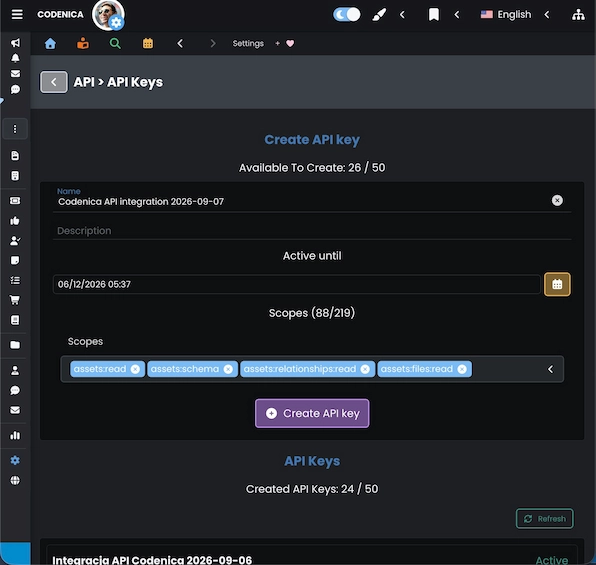
Key limits by license
Treat each key as a separate access channel for one integration. The number of available keys depends on the company's license:
Deleting a key removes its record and frees a place within the limit. The operation is permanent, so make sure the integration no longer uses the key before deleting it.
When a key reaches its expiration date, authentication stops, but the record remains visible in the list.
If you do not set an end date during creation, the default validity period is 90 days. The maximum active period for one key is 5 years. In practice, match the date to the review cycle of the integration.
API address and authentication
The base address depends on the deployment model. Append /api/v1 and the path of the selected resource to the base address.
- Cloud: use the company's public address, for example
https://your-company.codenica.com/api/v1. - On-Premise: the default address registered by Codenica Discovery is
http://codenica.local:5150/api/v1. If the administrator published the installation under a custom DNS name, reverse proxy or HTTPS, use the address available to the integration server. Deployment details are described in the Codenica On-Premise installation guide.
Do not use localhost, a container address or a database address unless the integrating application runs on exactly the same computer and this is an intentional test configuration. The integration server must have network access to the published Codenica address.
Authenticate every API request with two headers:
X-Codenica-Client-Id- the key identifier;X-Codenica-Client-Secret- the key secret.
Do not send a panel session or the user's JWT to the Public API. Never put the secret in a URL, query parameters, response content or logs.
export BASE_URL="https://your-company.codenica.com"
export CLIENT_ID="cna_your_client_id"
export CLIENT_SECRET="cns_your_client_secret"

curl --request GET \
  --url "$BASE_URL/api/v1/context" \
  --header "Accept: application/json" \
  --header "X-Codenica-Client-Id: $CLIENT_ID" \
  --header "X-Codenica-Client-Secret: $CLIENT_SECRET"
For the default On-Premise installation, replace BASE_URL in the example with http://codenica.local:5150. Use HTTPS in production when the installation is published with a certificate.
Standard request format
The examples in the following articles use a simple REST documentation format: method, URL, headers and, for operations with a body, JSON passed through --data-raw. You can transfer this format directly into application code or an integration tool.
Operations that change data also require an Idempotency-Key header. Give it a unique value for each operation intent. Repeating exactly the same request with the same key must not create a second record.
curl --request POST \
  --url "$BASE_URL/api/v1/<resource>" \
  --header "Accept: application/json" \
  --header "Content-Type: application/json" \
  --header "X-Codenica-Client-Id: $CLIENT_ID" \
  --header "X-Codenica-Client-Secret: $CLIENT_SECRET" \
  --header "Idempotency-Key: integration-create-20260907-001" \
  --data-raw '{"field":"value"}'
For updates, deletion, relationships and file operations, also send the If-Match header with the current ETag value. The individual object pages contain the exact paths, field names and request bodies.
Shared integration workflow
- Send
GET /api/v1/contextto check the company identity and caller, scopes, API capabilities and limits. - Open the schema for the object you need, for example
GET /api/v1/assets/schema, to learn its fields, operations, scopes and supported relationships. - Fetch object lists with pagination and filters. Filtering parameters are described in the article for the selected object.
- Read a single record by identifier when you need current data and its
ETag. - Create, update and delete records while using
Idempotency-Keyand, where required,If-Match. - Use relationships, files, batch operations and special actions only through the paths documented for the selected object.
Shared response format
Successful responses return data in the data property. Technical information such as requestId and, sometimes, ETag is placed in meta. Keep requestId in your integration log so that a request can be found quickly when diagnosing a problem.
ETag, retries and errors
ETag protects a record from overwriting changes made by another person or integration. After reading a record, save the ETag header value. Before updating or deleting it, send that value as If-Match. After a successful change, use the new value returned by the API.
- 428 Precondition Required with code
if_match_requiredmeans that the requiredIf-MatchorIdempotency-Keyheader is missing. - 412 Precondition Failed with code
if_match_failedmeans that the suppliedETagis no longer current. Read the record again and decide whether to repeat the change. - 429 Too Many Requests means that the limit was exceeded. Read the
Retry-Afterheader when it is returned and retry after that time with progressively longer delays.
Errors use the Problem Details format. The most important fields are status, code, detail and requestId. Do not treat the detail text as a stable error identifier - use code in application logic.
Responses also include limit headers such as X-RateLimit-Limit and X-RateLimit-Remaining. The integration should control its request rate, handle 429 and avoid an aggressive retry loop.
API articles for individual objects
After creating a key and checking the connection, choose the article for the data you want to integrate:
- API - Assets - computers, devices, software and other inventory items, including fields, relationships and files.
- API - Documents - company documents such as invoices, their descriptive data, files and relationships.
- API - Clients / Employees - client and employee records, contacts, organizational information and supported relationships.
- API - Vendors - vendor records and relationships available for this object, especially documents and notes.
- API - Tickets - Service Desk tickets, their lifecycle, operational fields, files and relationships.
- API - Changes - planned changes in the IT environment, implementation stages and process-control data.
- API - Problems - problems requiring root-cause analysis, process handling and links to other items.
- API - Releases - release planning and handling, statuses and information about changes being deployed.
- API - Solutions - knowledge-base solution entries and their problem relationships.
- API - Notes - notes, privacy, pinning, files and relationships with records.
- API - Approvals - approval processes, decision data, assignments and result handling.
- API - Confirmations - confirmations requiring a client decision, together with their files and relationships.
- API - Work Tasks - work tasks, assignments, statuses, relationships and attachments.
- API - Requested Items - requests for products or services, fulfilment data, files and relationships.
- API - Work Times - time entries related to a ticket, change, problem, release or work task.
Short checklist before launching an integration
- Create a separate key for each integration and grant only the scopes it needs.
- Store the Client ID and Client Secret in a secret store, not in a repository or browser-delivered code.
- Set a validity period that matches how the integration is managed.
- Use HTTPS in production and a company address reachable by the integration server.
- Log
requestId, the HTTP status and the error code, but mask the Client Secret. - Handle pagination, limits,
429,ETagand safe retries.
Once these points are covered, open the article for the selected object. It contains the paths, fields and operation examples specific to that type of data.