

Introduction to the permission system
The Codenica system has been designed to provide precise control over access to data and system functionalities. In practice, this means the ability to clearly define which users are allowed to view data, edit it, perform administrative actions, or manage tickets and IT assets. As an organization grows and the number of users increases, the need for a clear separation of responsibilities, permissions, and access scopes becomes essential.
When is it worth configuring custom permissions - even with a small number of accounts?
Custom RBAC permission configuration is not reserved only for large enterprises. In many cases, it makes sense already at an early stage of system adoption, when only a few agents are working in the organization (support staff, IT team members, help desk agents, etc.). The most common reasons for defining custom access roles include:- Limiting data visibility to specific companies, branches, or locations.
The system allows you to separate registered items (computers, devices, software, licenses, and more) into individual companies, branches, or locations. As a result, an agent can see and manage only the assets assigned to a specific organizational unit, which is particularly important for multi-branch organizations or companies serving multiple clients. - Separating ticket handling based on location and organizational structure.
Similar to IT asset management, tickets can be restricted to specific locations, departments, or companies. An agent does not need access to the entire ticket queue and can work only with tickets they are actually responsible for. - Restricting ticket visibility to selected ticket categories.
RBAC allows you to define that a given agent handles tickets only from specific categories (such as Help Desk, IT, Hardware, Software, Administration). This enables agent specialization and prevents access to tickets outside of their area of expertise. - Controlling the availability of communication channels in the client portal.
The system allows you to disable or limit access to specific communication channels in the client portal, such as the internal messaging system or live chat. This makes it possible to decide that customers or employees can contact only selected teams directly. - Improving security and maintaining order within the team.
Properly configured permissions reduce the risk of accidental changes, operational errors, and unauthorized access to data. Each agent works within a clearly defined scope, which simplifies team management and significantly increases overall information security.
What is RBAC (Role-Based Access Control)?
RBAC (Role-Based Access Control) is a proven and widely adopted permission management model in which access to system functions and data is not granted directly to individual users, but through roles assigned to them. Each role represents a logical set of permissions that define what a given user can view, edit, or manage within the system. As a result, access administration becomes significantly simpler, more transparent, and less prone to configuration errors.
In practice, this means that instead of manually configuring permissions for every new account, an administrator creates roles that reflect real responsibilities within the organization (for example: Help Desk - Hardware, Help Desk - Software, Company A Administrator, Company B Administrator, First-Line Support Agent, and similar roles). Assigning such a role to a user is enough to instantly provide them with a complete and consistent set of permissions.
Why is RBAC such an effective access control mechanism?
- Fast and simple user management.
RBAC allows administrators to grant a new agent a full set of permissions within seconds by assigning a predefined role. There is no need to manually select dozens of individual options, which significantly accelerates the onboarding process for new employees. - Consistency and repeatability of configuration.
Every user assigned to the same role has exactly the same access scope. This eliminates situations where agents performing the same function have different permissions due to accidental or inconsistent configuration. - Easy permission changes in the future.
Updating permissions within a single role automatically affects all users assigned to that role. This allows administrators to adjust access rules without modifying individual user accounts. - Clarity and order within the system.
Roles can be named freely to reflect organizational structure or responsibility scope, such as Help Desk Agent - Hardware, IT Agent - Software, or IT Department - US Branch. This makes system administration easier even with a large number of users. - Improved data security.
RBAC minimizes the risk of granting excessive permissions. Each user receives exactly the level of access required to perform their job - no more, no less.
In the Codenica role system, the mechanism forms the foundation of access management for system agents. It enables controlled restriction of data visibility, system functions, and operational actions, while maintaining the flexibility required for the day-to-day work of IT and Help Desk teams.
System Roles in Codenica
The Codenica system provides four core system roles: Administrator, Agent, Viewer, and Client. Each role is designed for a different way of using the system and a different level of access to data. A key and very important principle is that the RBAC (Role-Based Access Control) mechanism applies exclusively to users assigned the Agent role.
- Administrator - the highest level of access in the system. An Administrator always has full visibility of all data, locations, departments, tickets, IT assets, and system settings. This role is not subject to any RBAC limitations and cannot be assigned a role. Administrators are responsible for system configuration, user management, global settings, and overall supervision of ITSM and ITAM processes.
- Agent - an operational role intended for users who work daily with tickets, inventory, and IT assets. This is the only system role to which roles can be assigned. As a result, an Agent’s data visibility can be restricted to specific locations or company branches, ticket handling can be limited to selected categories, access can be confined to a defined part of the IT inventory, and permissions can be granted only for selected system functions.
- Viewer - a free, read-only account intended solely for viewing data without the ability to edit it. The Viewer role is not subject to the RBAC mechanism and has a predefined, limited set of permissions.
- Client - an end-user or employee account used within the Client Portal. The Client role allows users to submit requests, communicate with the IT department, and view their own tickets and related information, but it is not covered by the role mechanism.
Switching Between Administrator and Agent Roles with One Click
A significant advantage of the Codenica system is the ability to change a user’s system role between Administrator and Agent at any time, without modifying the application configuration. This change can be performed with a single click in the Client Panel. This flexibility makes it easy to respond to organizational changes, temporarily elevate or reduce user privileges, and plan the IT team structure without any risk of data loss.
How to Plan Roles in Practice
In practice, it is recommended that only a small number of accounts are assigned the Administrator role-typically those responsible for system configuration and overall IT environment supervision. All other operational users should work as Agents with assigned roles. This approach enables precise control over data visibility by location, branch, ticket category, or responsibility scope. Administrators retain full system visibility and control, while Agents operate strictly within the access range required to perform their daily tasks.
Creating and Configuring a Custom RBAC Role
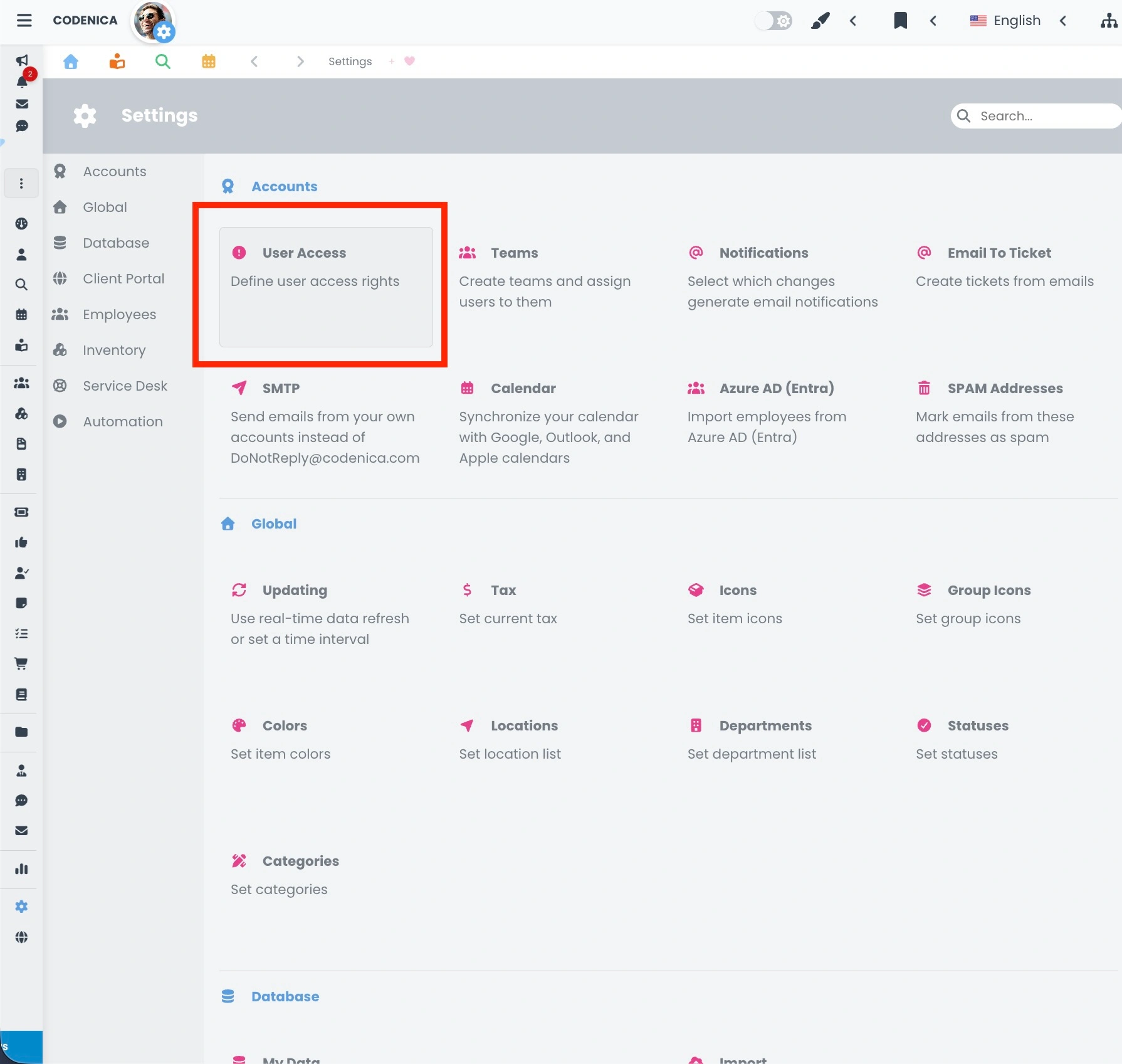
At this point, we move on to the practical part. Custom roles in the Codenica system are configured directly within the application settings. To begin, open System Settings and then navigate to Accounts → Permissions. This section displays the main permissions management panel, which is divided into four logical groups that together form a complete RBAC mechanism.
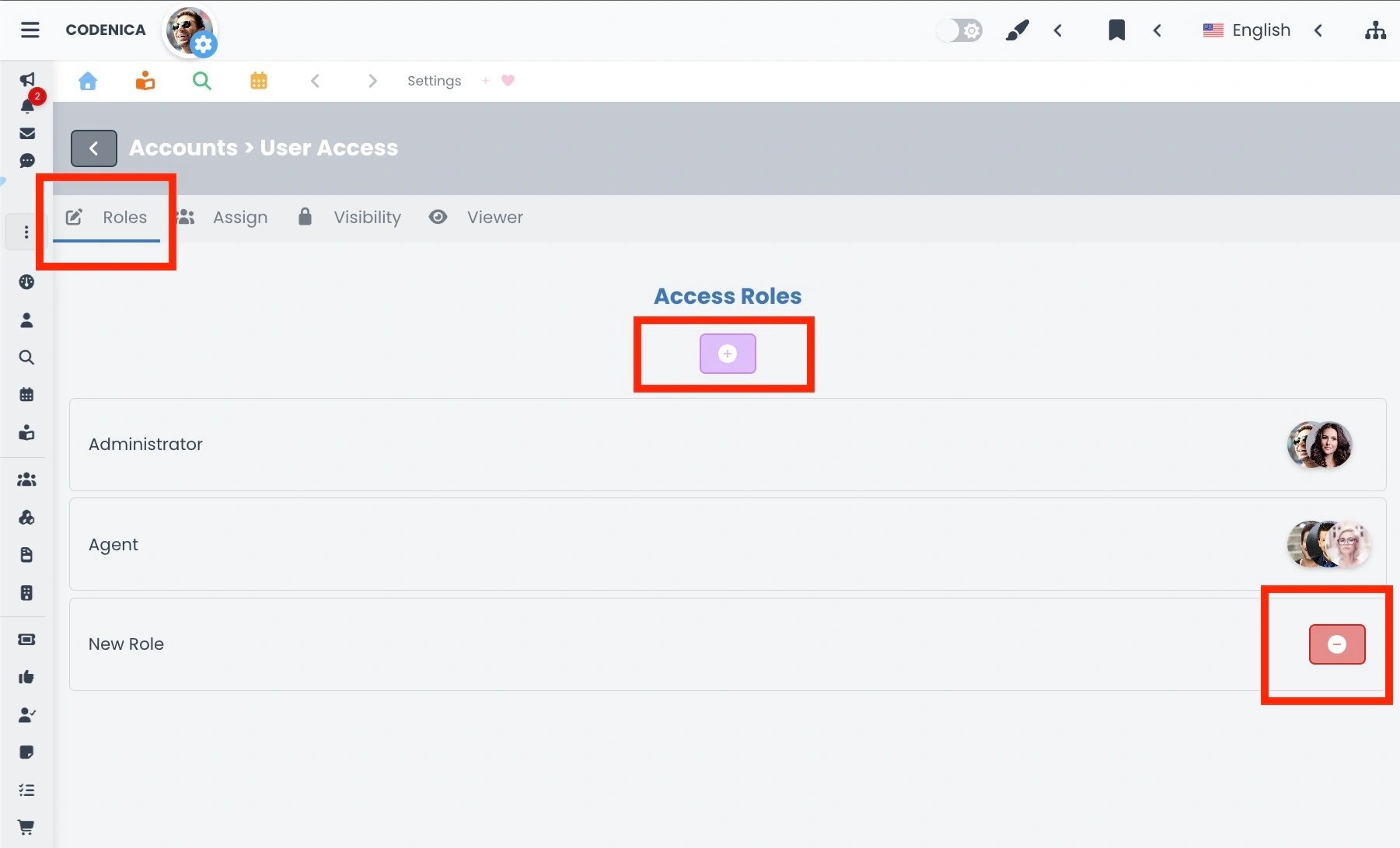
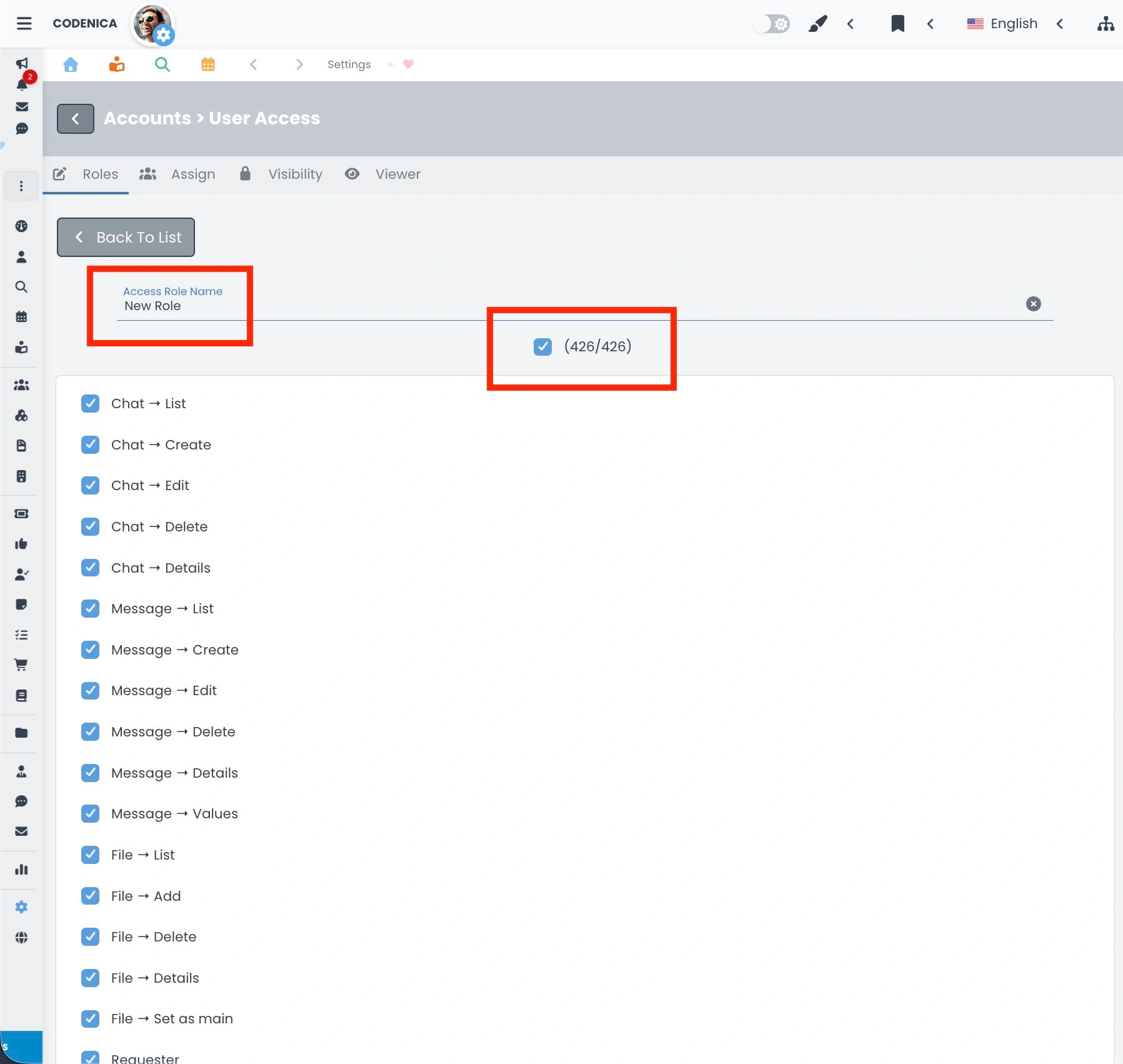
- Role. The first group displays a list of all roles created in the system. In addition, the first two entries are always visible and non-editable system roles: Administrator and Agent. All roles are presented as clear panels containing the role name and an avatar representing the user assigned to that role. Clicking on a specific role panel opens its details. Here, you can define the role name and select the appropriate checkboxes that grant access to specific system functions. This is where the actual permission scope of the role is defined.
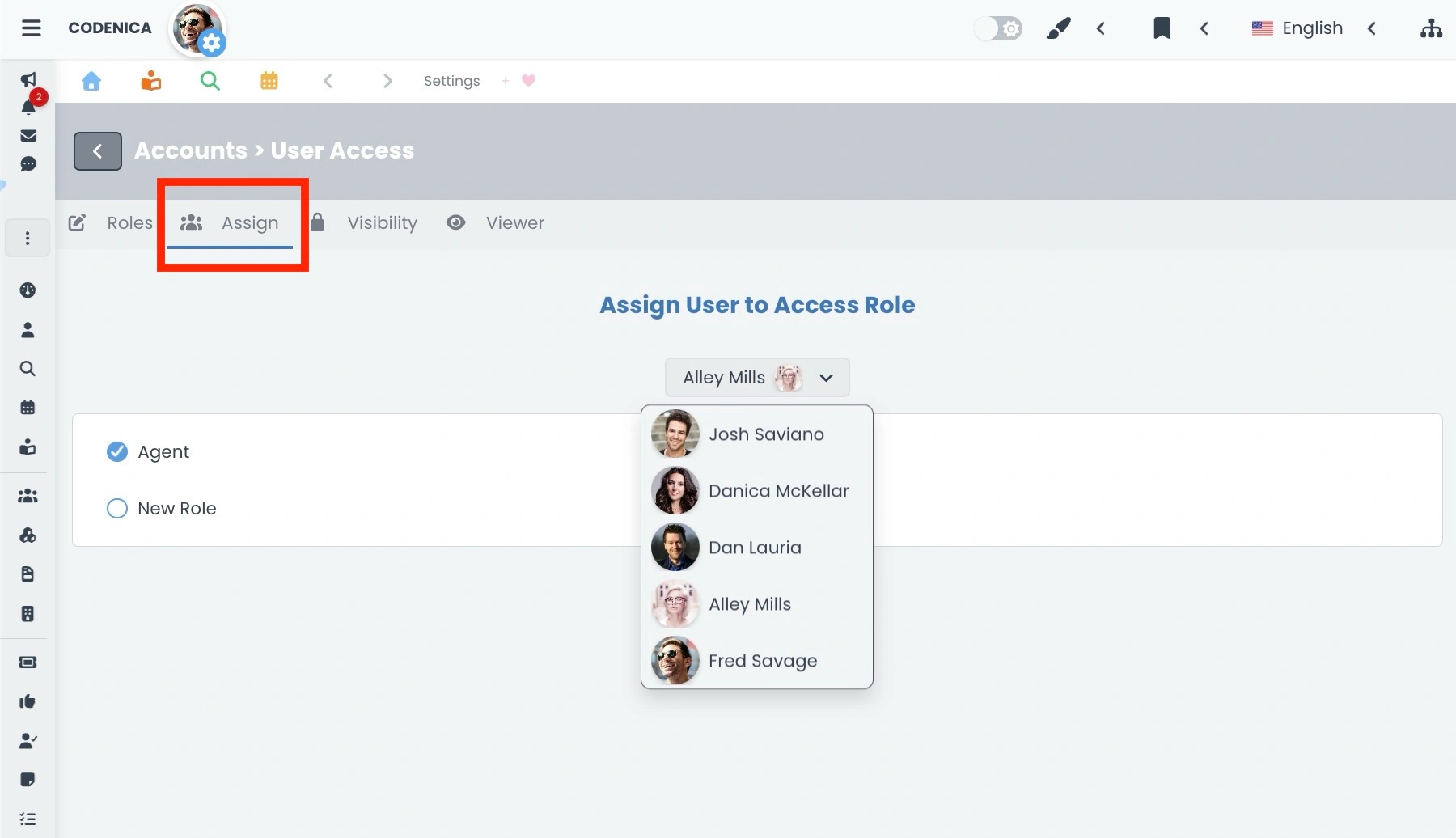
- Assign. This section is used to specify which user account is assigned to a given role-either a system role or an RBAC role. A very important rule applies here: RBAC roles can only be assigned to users who have the system Agent role. Administrators are not subject to the RBAC mechanism and always have full system access. This section enables fast and efficient team management, as changing a user’s role does not require editing individual permissions-only assigning the appropriate role.
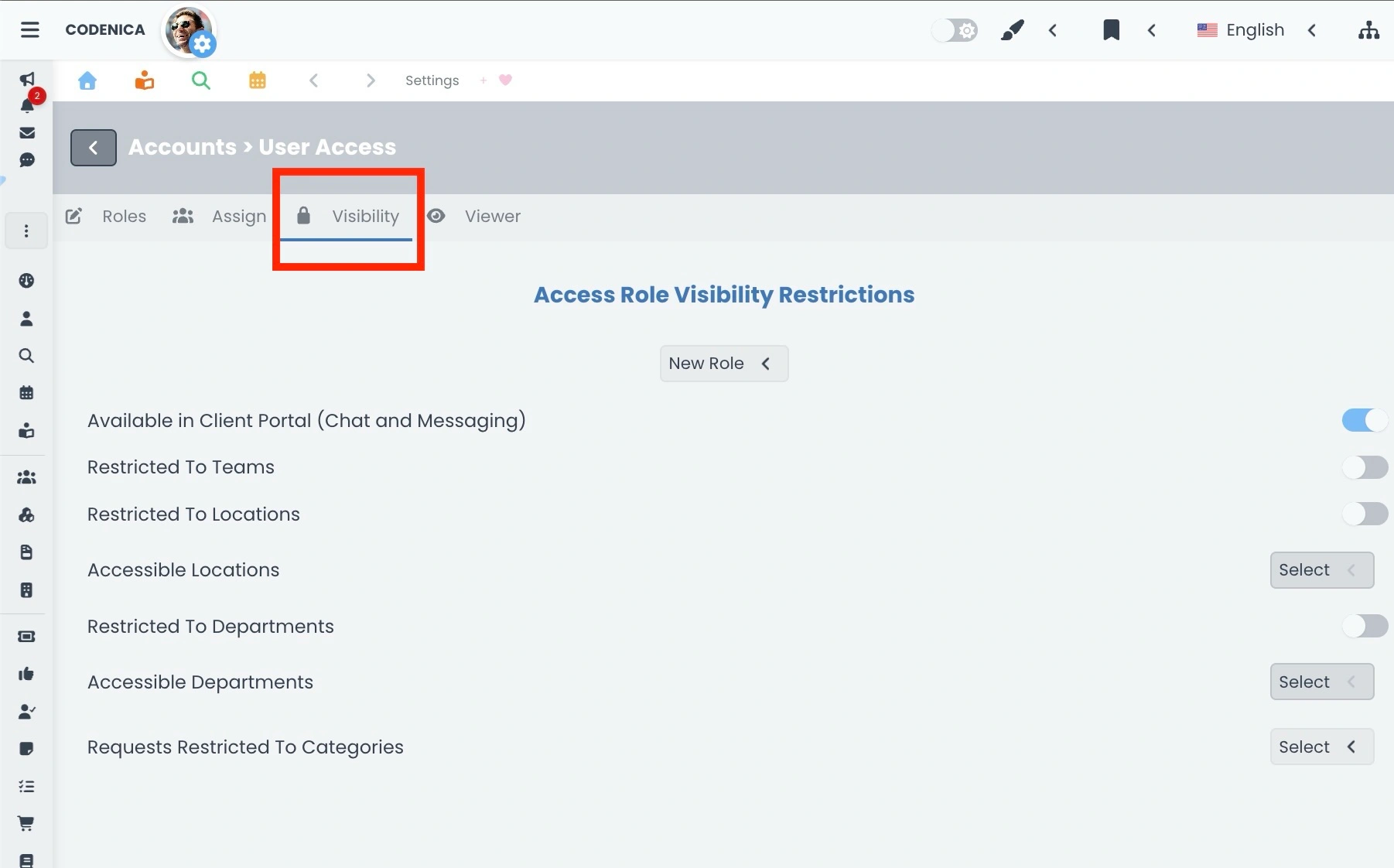
- Visibility. The third group is responsible for precisely limiting the scope of data visible to a selected RBAC role. First, a specific role is selected, and then its visibility within the system can be configured.
- Defining whether the role is available for contact in the Client Portal.
- Restricting access to one or multiple company locations.
- Limiting visibility to selected company departments or branches.
- Restricting the role to operate only within a specific team.
- Specifying whether the role can handle tickets only from one or multiple selected ticket categories.
- Viewer. The final group allows changing the password for the Viewer account. The Viewer account is a free, read-only account intended solely for data viewing and is not subject to RBAC configuration.
This structured division of settings ensures that configuring roles in Codenica is clear, logical, and manageable-even in highly complex organizational environments.
Summary
The RBAC permission system in Codenica is the foundation of secure and well-organized work within an IT environment. By clearly separating system roles from access roles, it becomes possible to precisely define who can work with specific data, tickets, and system features-and to what extent. A key principle is that the RBAC mechanism applies exclusively to users with the Agent role, while the Administrator always retains full access to the entire system. In practice, this means that an organization can safely scale its ticketing system, expand team structures, and increase the number of supported locations, departments, or clients-without the risk of permission chaos. Agents can handle only those tickets that fall within their defined scope of responsibility, selected ticket categories, or specific organizational units. The RBAC mechanism also provides strong support for IT asset management. Properly configured roles allow access to records and inventories of hardware, software, and licenses to be limited strictly to the elements an Agent is actually responsible for. This is critically important both for multi-branch organizations and for companies delivering IT services to multiple clients. Thanks to centralized role management, administrators can quickly and consistently assign permissions to new users, adjust access scopes for entire teams, and respond to organizational changes without manually configuring individual accounts. This approach significantly increases data security, streamlines team workflows, and minimizes the risk of operational errors. In summary, a well-designed role and permission system in Codenica is not just about access control-it is a practical, everyday support tool for help desk, service desk, ticketing systems, and IT asset inventory and management. It supports organizational growth while maintaining clear control over system access at every stage.